

Cloudy. High around 45F. Winds light and variable..
Some clouds. Low 23F. Winds light and variable.
Updated: January 27, 2022 @ 12:48 pm
Tahlequah, Oklahoma
Brian D. King | Daily Press
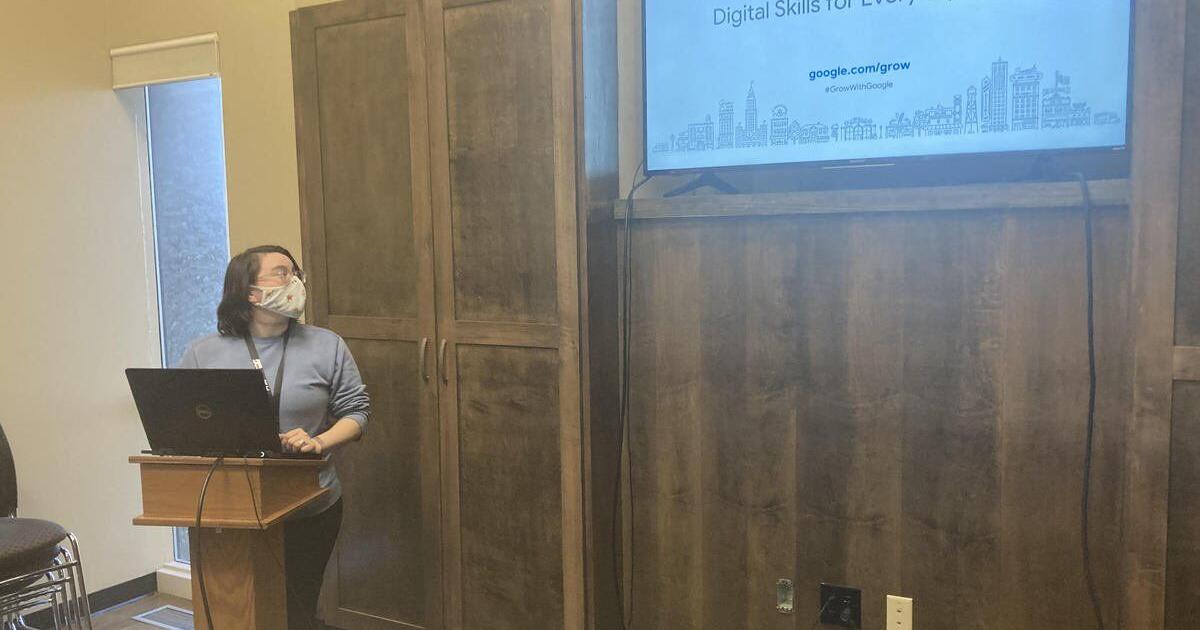
Gerran Walker of the Tahlequah Public Library hosts a tech class every month. On Jan. 25, patrons had the opportunity to learn how to improve basic digital skills.
Brian D. King | Daily Press
Gerran Walker of the Tahlequah Public Library hosts a tech class every month. On Jan. 25, patrons had the opportunity to learn how to improve basic digital skills.
This month’s Tech Class at the Tahlequah Public Library was called, “Digital Skills for Everyday,” and its purpose was to teach locals how to make better use of their Google applications.
Every fourth Tuesday of the month, the library hosts Tech Class, which prepares attendees to take advantage of the digital world. The class is taught by librarian Gerran Walker in collaboration with Google, which provides the teaching materials.
Walker explained that Google Workplace apps are becoming popular because, unlike Microsoft Office Suite, they are free to anyone who has a Gmail account.
Google apps addressed in the course include Google Drive, Google Docs, Google Slides, Google Sheets, Google Photo, Google Meet, and Google Calendar. In addition to Gmail, Google Workplace apps also offer Google Forms, Google Sites, Google Chat, Google Currents, Google Keep, Jamboard, and Google Workspace Marketplace.
For those who own an Android device or a Chromebook, Google Workspace is preinstalled, so owners are immediately ready to use their apps. Google Workspace apps can be downloaded onto Apple devices and PCs.
Walker addressed Google Drive, which is Google’s cloud storage.
“The best thing about Google Drive, if you can access your Gmail, you can get your documents with any computer in the world. You don’t have to worry about carrying a flash drive. If you sign into your email, they are all right there,” she said.
Those who are used to using Microsoft Office Suite can easily learn to use Google Docs, Google Slides, and Google Spreadsheets, because the apps are compatible with Microsoft Word, PowerPoint, and Excel.
In the class, students learned how to create a numbered list, and how to bold and change font sizes.
“In Google Sheets, we’ll cover how to make a to-do list. It is easy to do, rather than making a bulleted list, you can make a checkbox list. It is really cool,” said Walker. “If you click in the box, it will check the box and cross out the line on the spreadsheet.”
On Google Slides, students learned how to make a slideshow, which is useful for weddings and birthday parties.
Another feature for all Google applications is the automatic save.
“If you have been typing, and the power goes out, in the past, you’d lose all of your work. In Google, the second you type, it is constantly saving,” said Walker.
She also introduced students to Google Photos, which is good for storing pictures. Users will automatically take pictures to a cloud, which frees up space on their devices.
“If you break your phone or lose it, you can still access your photos from any other device,” she said. “It is a lifesaver because a lot of people keep important photos on their phone.”
Photos are not just selfies, but many users take pictures of important documents. Having a vaccination card or a permission form can be useful to have on hand with Google Photos.
Tahlequah Public Schools is one of many districts in the area that issues Chromebooks to students, who are learning to use Google Workspace, alongside Google Classroom.
While some classrooms use Zoom for teleconferencing, others use Google Meet because it is free and has no time limit restrictions.
“Education-wise, classrooms use Google Classrooms,” said Walker. “Teachers can assign assignments and homework that way.”
Those who do not have internet at home can still use Google Workspace apps on their Chromebooks and PCs. When their devices get online, they will automatically sync up.
Walker also addressed Google Calendar, which is a good tool for families.
“You can share your calendar with other people. If you have the Google Calendar on the phone, you can share it with another person. If your kid has a lot of activities, and you want to share it with your spouse, you can. You can coordinate with grandma or grandpa to pick up kids. If an event like a soccer game is canceled, you can mark it on your calendar, and it will go to the person you shared it with,” she said.
What’s next
On Feb. 22, Tech Class will meet again at the TPL, and Walker will address library apps, including Hoopla, Freegal, and Libby, which allow users to check out free eBooks and more.
{{description}}
Email notifications are only sent once a day, and only if there are new matching items.
[mdash] age 72 of Stilwell, OK. Truck Driver. Died Sunday, January 23rd, 2022 in Stilwell, OK. Funeral services Friday, January 28th, 2022 at 3:00pm at Reed-Culver Funeral Home. Visitation prior to services at 2:00pm.
[mdash] age 77 of Tahlequah, OK. RN. Died January 23rd. Mass of Christian Burial January 27th at 2:00pm at St. Brigid. Burial at Holland Cemetery. Visitation January 26th from 3:00pm until 6:00pm, Rosary to follow at Reed-Culver.
[mdash] age 65 of Cookson, OK. Waitress. Died Thursday, January 20th, 2022 in Tulsa, OK. Memorial services Thursday, January 27th, 2022 at 10:00am at Reed-Culver Chapel.
Sorry, there are no recent results for popular commented articles.
Sign up now to get our FREE breaking news coverage delivered right to your inbox.
First Amendment: Congress shall make no law respecting an establishment of religion, or prohibiting the free exercise thereof; or abridging the freedom of speech, or of the press; or the right of the people peaceably to assemble, and to petition the Government for a redress of grievances.